
Flagship product, founder and sole developer
Asaan Optics
Optical shop software for Android and Windows: prescriptions, counter sales, stock and staff shifts on one shared shop account.
- Platforms
- Android (Google Play) and Windows 10/11
- Built by
- Farhad Nazir, founder and sole developer
- Current versions
- Android 4.11.0, Windows 6.7.6
- Languages
- 9, including Arabic and Urdu (right to left)
- Optical calculators
- 19, in five categories
- Tax support
- Saudi VAT with ZATCA QR, India GST receipts
Software for the optical shop counter
Asaan Optics is software for running an optical shop. It keeps patients and their eye prescriptions, spectacle orders and repairs, frame, lens and contact-lens stock, counter sales, staff shifts and receipts in one shop account that works from a Windows PC at the counter and an Android phone.
I started it as my own product under Techwine Solutions and I am still its only developer. I designed and built the Android app, the Windows desktop app, the Node.js backend, the subscription billing, the release pipelines and the website at asaanoptics.com, and I recorded the tutorial videos that teach shops how to use it.
It began with opticians in Pakistan and has since been extended for shops in Saudi Arabia, the Gulf and India, with nine app languages, Saudi VAT receipts with a ZATCA QR code and GSTIN on Indian receipts.
Built for: Opticians, eyewear stores and eye clinics that want prescriptions, stock, sales and staff in one place, on the counter PC and on the phone.
What shops were struggling with
Prescriptions lost in paper registers
Eye prescriptions, frame choices and lens orders were written in notebooks. Finding a customer's last prescription meant flipping pages, and old records went missing.
Balances nobody followed up
Customers paid an advance and collected their glasses later. Without a list of pending balances and due dates, money owed to the shop was easy to forget.
Stock with no known value
Frames, lenses in many powers and contact lenses sat on shelves with no record of what they cost, what was running low or what had not sold in months.
Cash that could not be checked
With several staff on one counter, there was no shift record, no end-of-day report and no trail of who changed or deleted a sale.
Unreliable internet
Many shops lose their connection during the day. Software that stops billing when the internet drops is not usable at a busy counter.
One shop account, two apps
The counter PC and the owner’s phone work from the same records, so a sale rung up at the shop shows up on the phone at home.
Asaan Optics Desktop Pro for Windows
The counter and back-office program. It handles the full working day, from the first prescription order to closing the cash drawer, and keeps billing when the internet drops.
- Prescriptions, counter sales, repairs and customer search
- Stock Control Center with barcode labels for thermal printers
- Staff shifts with X and Z reports and a staff audit log
- Saudi VAT and India GST receipts on A4 or thermal paper
- Self-updating installer for Windows 10 and 11, 30 days free
Asaan Optics for Android
The app for the chair, the shop floor and the owner away from the shop. It reads printed prescriptions with the camera, sells from the same stock and shares receipts.
- Prescription orders with prescription scanning (OCR)
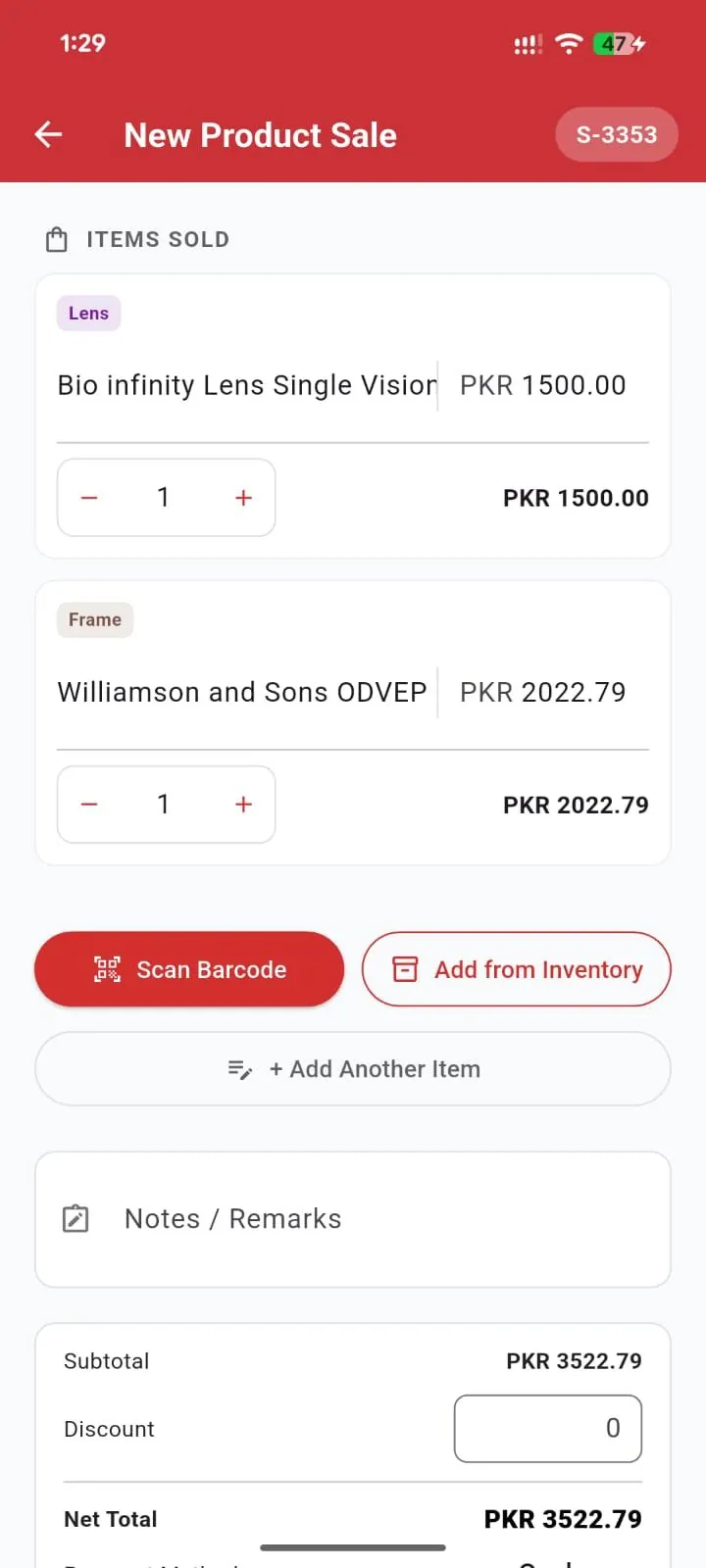
- Product sales by camera barcode scan or from stock
- Eye screening aids: acuity chart, Amsler grid, colour and pinhole tests
- Home-screen widgets for quick actions, today's work and deliveries
- Free to install, with paid plans through Google Play
One shop account
The PC and the phone sign in to the same shop, so customers, prescriptions, stock and sales are shared between them.
Numbers that never repeat
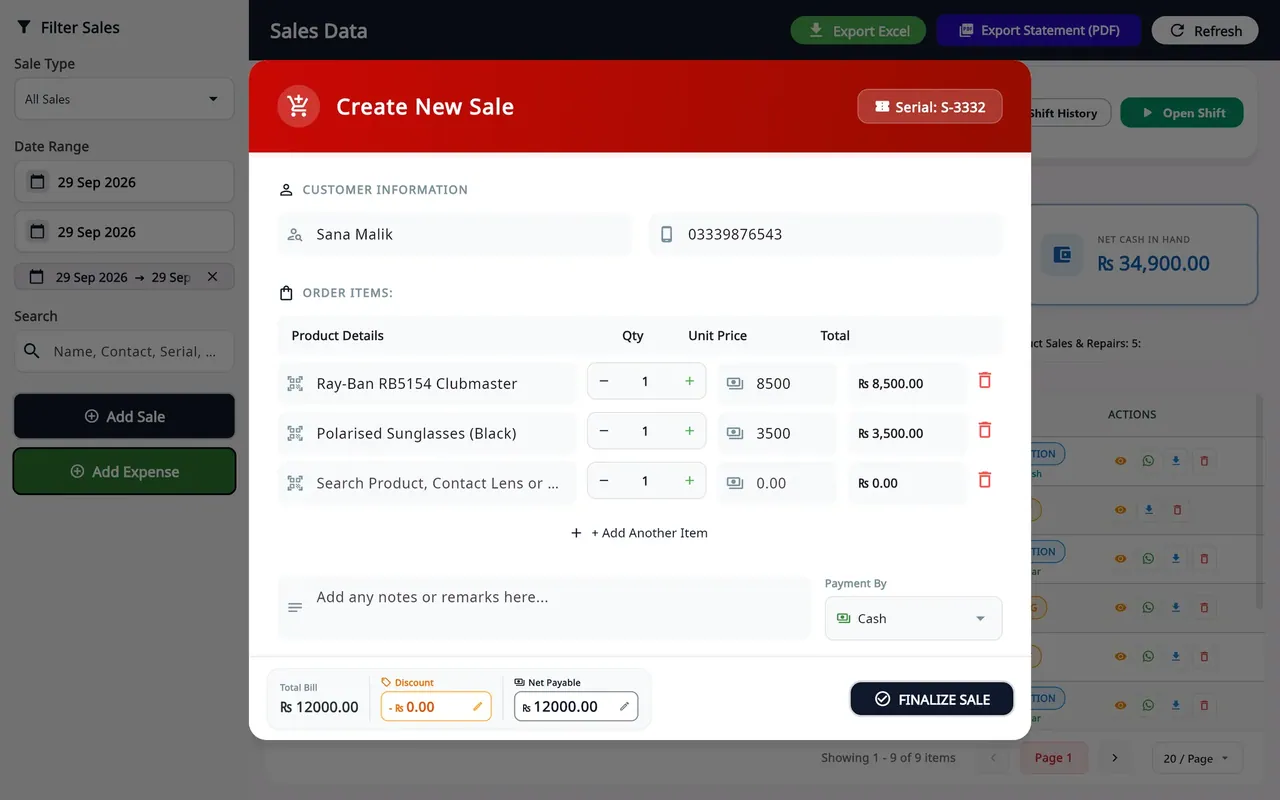
Sale serial numbers are issued by the server, so a bill made on the phone and one made on the PC never get the same number.
Offline without duplicates
Work saved without internet waits on the device and is sent when the connection returns, with a key that stops the same sale being recorded twice.
Same staff rules everywhere
Staff permissions follow the account, and staff phones do not see money figures on the home-screen widgets.
What the software does
Every feature below is in the shipped apps today, checked against the source code.
Patients and prescriptions
The prescription is the centre of an optical sale, so the apps are built around it.
Customer records and search
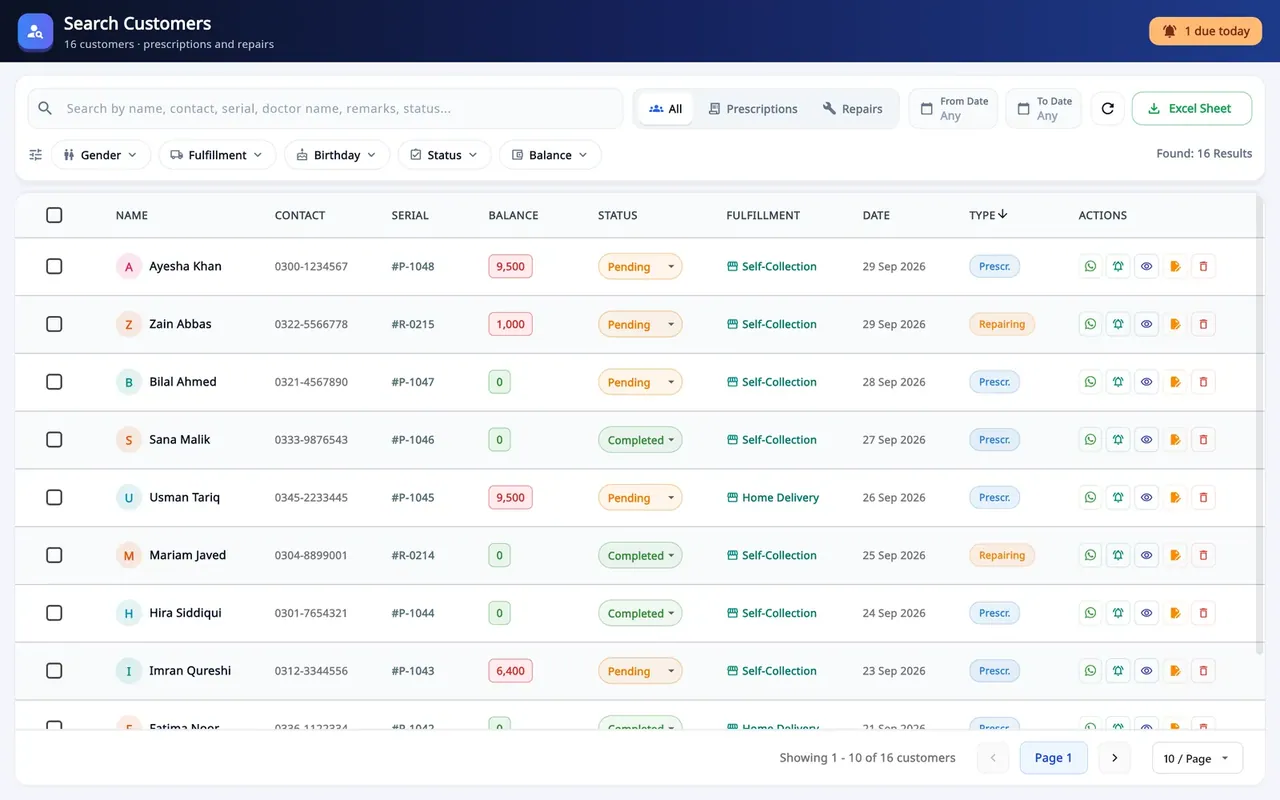
Search by name, phone, serial, doctor or remarks, filter by status, balance, fulfilment or birthday, and export to Excel.
Prescription orders
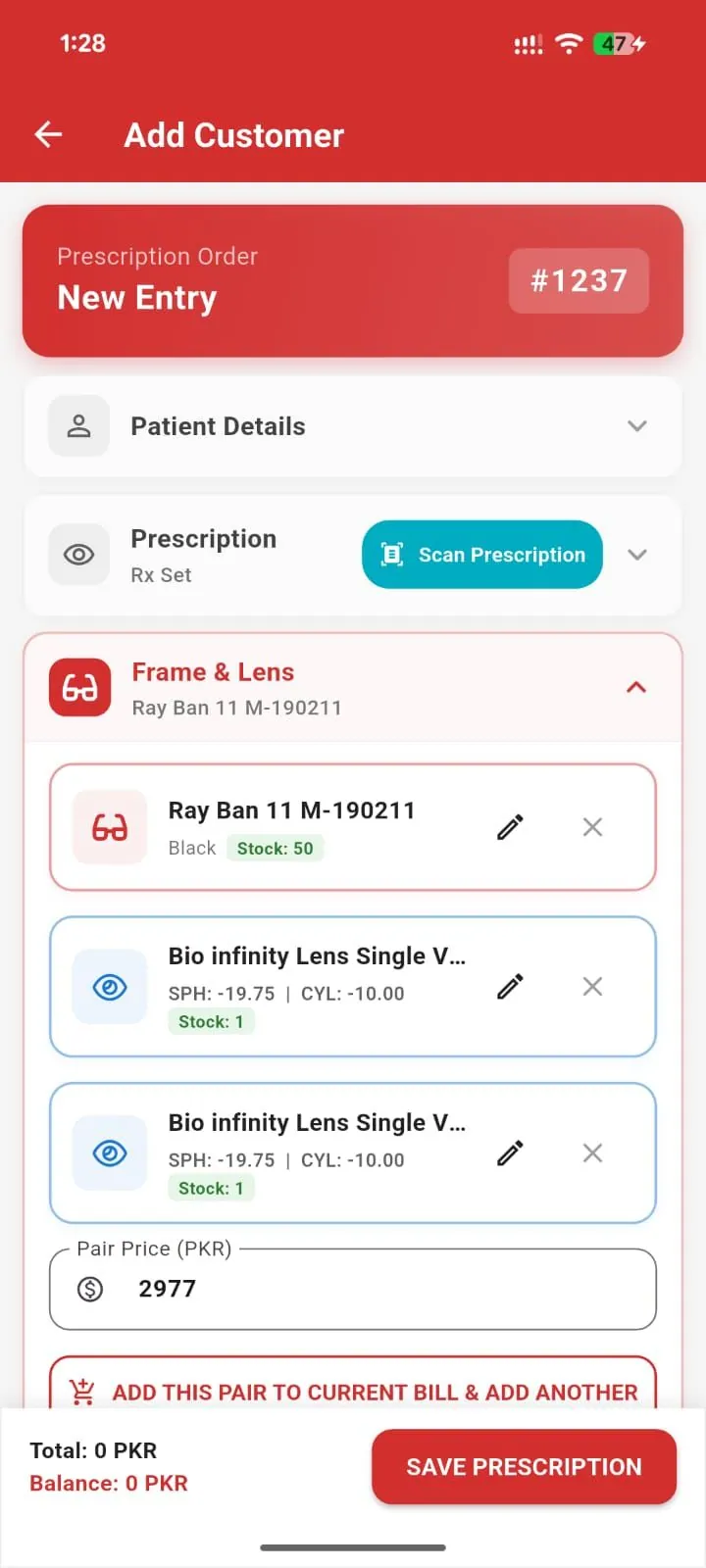
SPH, CYL, AXIS, ADD, IPD and PD for each eye, frame and lenses picked from stock, several pairs on one bill, and advance and balance due.
Scan a printed prescription
On Android, the camera reads a prescription slip on the phone (OCR). A parser checks the values against optical rules and highlights anything doubtful for staff to confirm.
Repair jobs
Repairs have their own serial series, status, balance and receipt, separate from prescription orders.
Eye screening aids (Android)
A tumbling-E acuity chart calibrated to each phone's screen against a bank card, an Amsler grid, a colour test and a pinhole record, saved to the customer.
Sales, POS and billing
A counter that keeps working when the internet does not.
Counter sales
Sell by barcode or search, with quantities, discounts and cash, card or other payment methods, plus shop expenses on the same screen.
Receipts on paper and WhatsApp
PDF receipts for A4 and thermal printers, including Arabic text. The app writes the receipt or pickup message and opens the customer's WhatsApp chat for staff to send.
Saudi VAT and India GST
One tax rate, inclusive or exclusive, with a ZATCA QR code on Saudi receipts and GSTIN on Indian receipts. ZATCA Phase 2 e-invoicing is built into the Windows app and switched on per device after onboarding.
Statements and exports
Filter sales by type and date, then export them to Excel or a PDF statement.
Inventory and barcodes
Optical stock is not generic retail stock, so each kind has its own fields.
Frames, lenses and contact lenses
Frames, spectacle lenses by single power or power range, contact lenses and accessories, each with its own stock list.
Barcode labels
Code 128 labels laid out for thermal sticker printers, read back with a USB scanner on the PC or the phone camera.
Stock Control Center
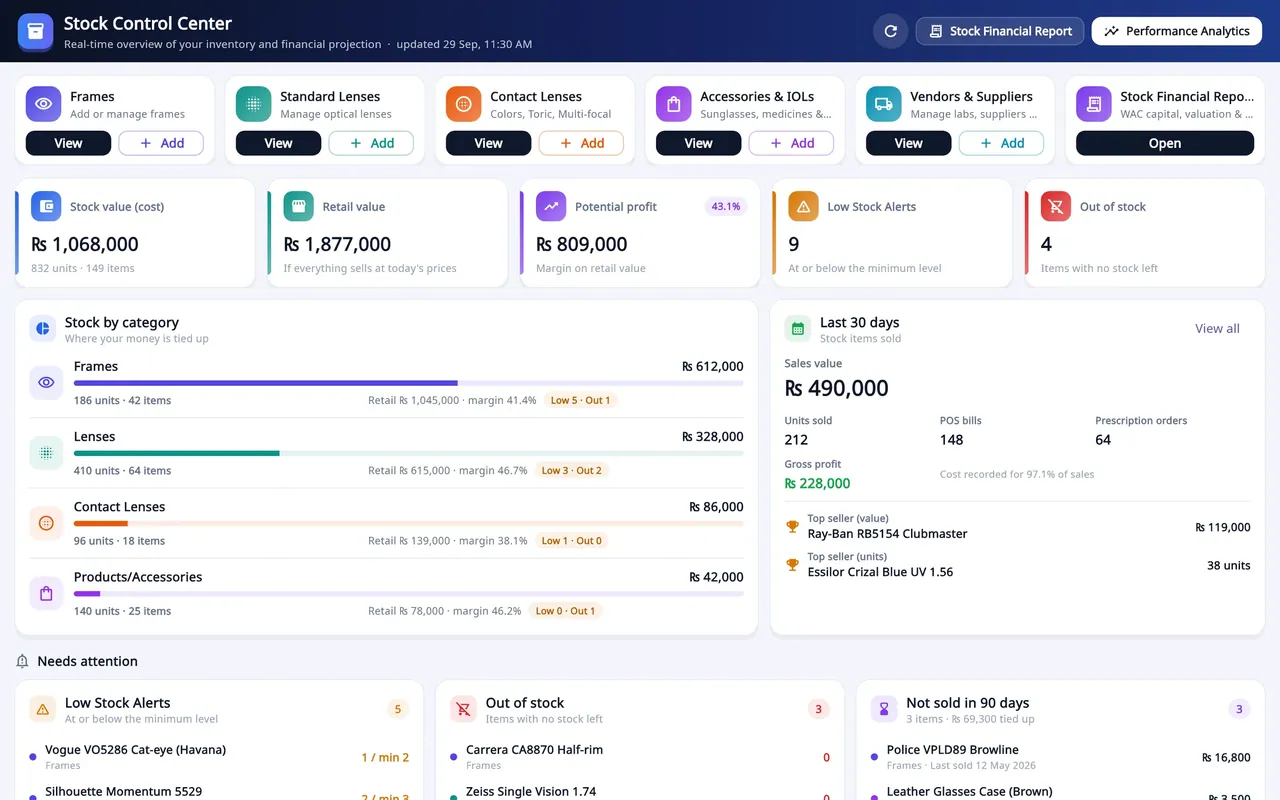
Stock value at cost and retail, potential profit, stock by category, and alerts for low stock, out of stock and items not sold in 90 days.
Vendors and supplier ledgers
Supplier accounts with bills, payments and returns, and a stock movements ledger.
Spreadsheet import
A five-step wizard imports customers and stock from Excel or CSV, checks rows on the server first and returns a file of rejected rows.
Staff, shifts and audit
Owners can see who did what at the counter, and when.
Staff logins and permissions
Owner and staff accounts, with access set per screen: dashboard, add customer, search, repairs, POS and stock control.
Shifts with X and Z reports
Each till opens and closes shifts, records cash movements and prints X and Z reports on a thermal printer.
Manager overrides and audit
Sensitive actions need a manager PIN and deletions need a reason, all recorded in the staff audit log.
My Branches (Windows)
An owner with several shops sees each branch's sales, bills and low stock on one screen and can enter a branch to work in it. Each branch keeps its own stock, staff and plan.
Reports and tools
Daily numbers and the optical maths opticians reach for at the counter.
Dashboard
Monthly revenue, customer growth, pending accounts, store expenses, a weekly revenue chart and cash-flow composition.
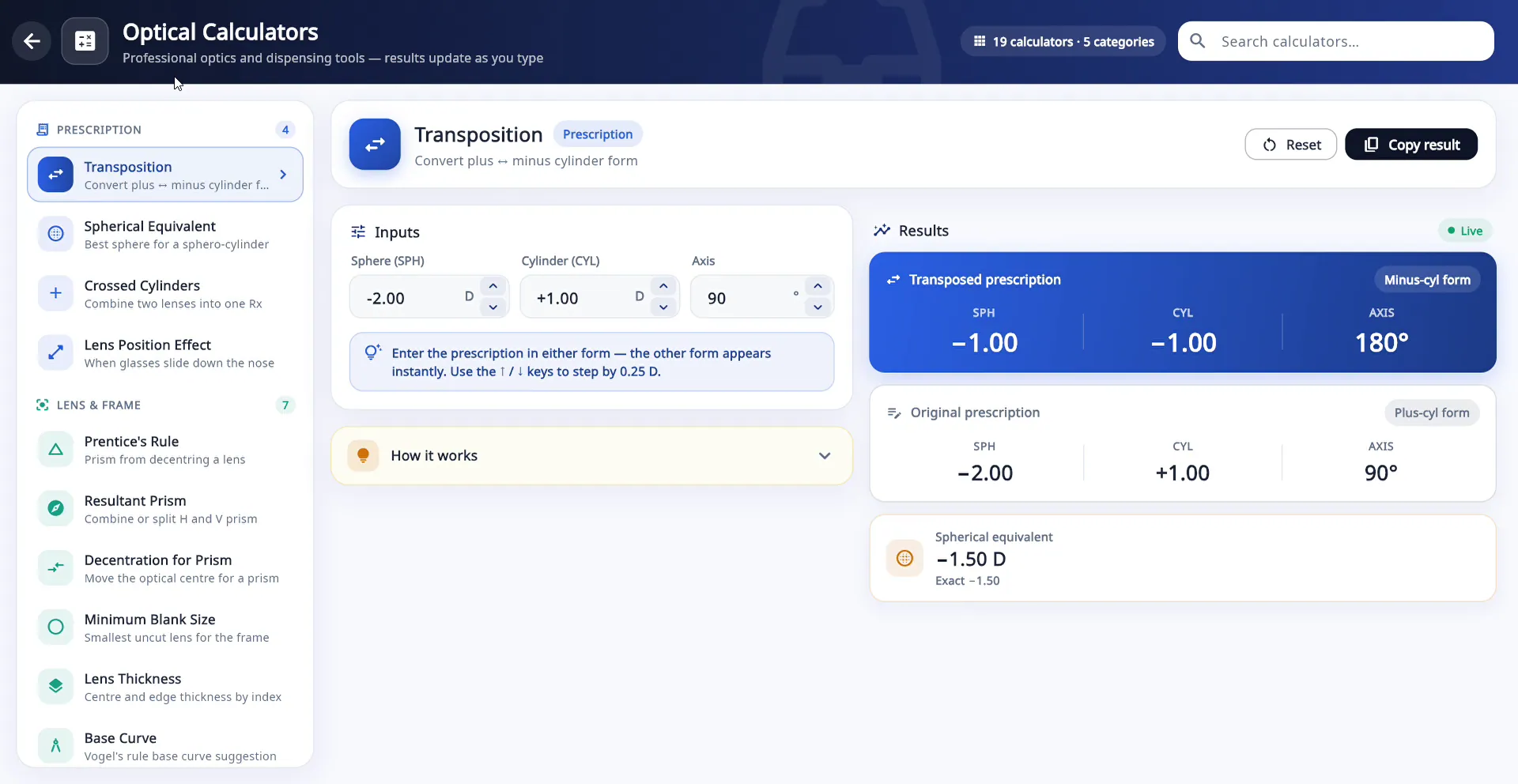
19 optical calculators
Transposition, vertex distance, spherical equivalent, Prentice prism, lens thickness, blank size, near add and more, in five categories. The free plan opens three.
Offline help panel
Answers how-to questions from a built-in product guide and can run simple actions, such as finding a customer or showing today's sales, without an internet connection.
Home-screen widgets (Android)
Quick actions, today's numbers and pending deliveries on the phone's home screen.
Plans, sync and security
A subscription product that shops can trust with their records.
Free tier and paid plans
Mobile, Desktop Pro and Bundle plans, paid through Google Play on Android or by card for the desktop, with a 30-day free trial on Windows.
Offline-first
Sales and records saved offline are kept on the device and sent later without duplicates, and the Windows till keeps its cash ledger locally.
Account security
Email or Google sign-in, sign-in tokens kept in Windows Credential Manager or secure storage, a fingerprint or face lock on Android, and in-app account deletion.
Nine languages
English, Urdu, Arabic, Hindi, Turkish, German, Spanish, French and Portuguese, with right-to-left layouts for Arabic and Urdu.
Automatic desktop updates
The Windows app checks for new versions and installs them in the background, without a Windows permission prompt.
Technical architecture
Asaan Optics has two Flutter clients, an Android app and a Windows desktop app, on one multi-tenant REST API written in Node.js and Express 5. Production data lives in TiDB Cloud, a MySQL-compatible database, behind 61 tables added through dated SQL migrations. Firebase handles sign-in and push notifications and still holds some shop profile and plan data from the product's earlier Firestore days.
The clients are offline-first. Writes carry an idempotency key and fall back to a durable queue, reads fall back to a local cache, and point-of-sale money events are written to SQLite on each till. Subscriptions run through Google Play billing via RevenueCat for Android and Lemon Squeezy card checkout for desktop plans, and the server decides which paid features a shop can use.
I release the Android app through GitHub Actions and fastlane to Google Play, and the Windows app as an Inno Setup installer served from asaanoptics.com, which checks a version manifest and updates itself. The three codebases carry around 280 automated test files between them.
Apps
Mobile app
Flutter for Android (Google Play) with an iOS release pipeline
Desktop Pro
Flutter for Windows, Inno Setup installer and auto-update
asaanoptics.com
Product site, downloads, pricing and desktop checkout
On the device
Offline write queue
Every write carries an idempotency key and replays safely when the connection returns
Local SQLite ledger
POS shifts and cash-drawer events stored per terminal with a sequence number
On-device OCR
Google ML Kit reads printed prescriptions without uploading them
Receipts and labels
PDF (A4 or thermal) receipts, barcode labels, WhatsApp sharing
Cloud
Node.js / Express 5 API
Tenant-scoped routes for customers, prescriptions, sales, repairs, inventory, POS shifts, eye exams, imports, billing and messaging. Rate limiting, validation and idempotent replays.
Firebase
Authentication (email and Google), push notifications, storage
Data
TiDB Cloud (MySQL)
Canonical business data across 60+ migrated tables
Cloud Firestore
Shop profile and subscription state
Integrations
WhatsApp
Receipts and reminders via share links and the Meta Cloud API
Google Play Billing
In-app subscriptions through RevenueCat, verified by webhook
Lemon Squeezy
Desktop and bundle plans with signed webhooks
Easypaisa
Mobile-account payments in Pakistan
ZATCA Fatoora
Saudi Phase 2 e-invoicing, signed in Dart
ZEISS VISUSTORE
Lens orders sent straight from the shop
Engineering decisions that matter
- Offline sales that are never counted twice
- Every write carries an idempotency key. If the network fails, it goes into a durable queue on the device and is replayed later. The server stores the first successful response for each key, so a sale that timed out on the client but did save on the server is returned, not duplicated. Writes the server rejects move to a review list instead of blocking the queue.
- A cash ledger on every till
- Each Windows till keeps its shifts and cash drawer in a local SQLite database. Every money event and its per-terminal sequence number are written in the same transaction, amounts are stored in the smallest currency unit, and X and Z report numbering survives a logout.
- Tighter tenant isolation without breaking installed apps
- I moved the API to SQL-backed session tokens and made every signed-in request prove it only touches its own shop. A transitional auth layer accepted older app versions while shops moved over, and a per-shop setting switches a shop to tokens only.
- ZATCA Phase 2 signing written in Dart
- For Saudi shops I wrote the e-invoicing package myself: UBL 2.1 invoice XML, ECDSA signatures, the Phase 2 QR code, device onboarding and the Fatoora API. Each PC acts as its own invoicing unit, keeps its signing key in Windows secure storage and signs simplified invoices before printing.
- A prescription reader that works offline
- ML Kit reads the text on the phone, then a Dart parser rebuilds the prescription table from word positions, straightens tilted photos, maps right and left eye labels in several languages and checks values against optical rules such as 0.25 D steps and axis 1 to 180. There is no cloud call and no per-scan cost.
- Barcode labels measured in printer dots
- Label layouts are calculated in the printer's own dots for 203 and 300 dpi thermal printers, so every Code 128 bar is a whole number of dots wide and scans reliably on low-cost sticker printers.
Technology
- Flutter
- Dart
- Node.js
- Express.js
- MySQL
- SQLite
- Firebase
- Android
- Google ML Kit
- RevenueCat
- Inno Setup
- GitHub Actions
Product preview
Real screens from the Windows and Android apps and the live website.
Counter sales and stock on Windows
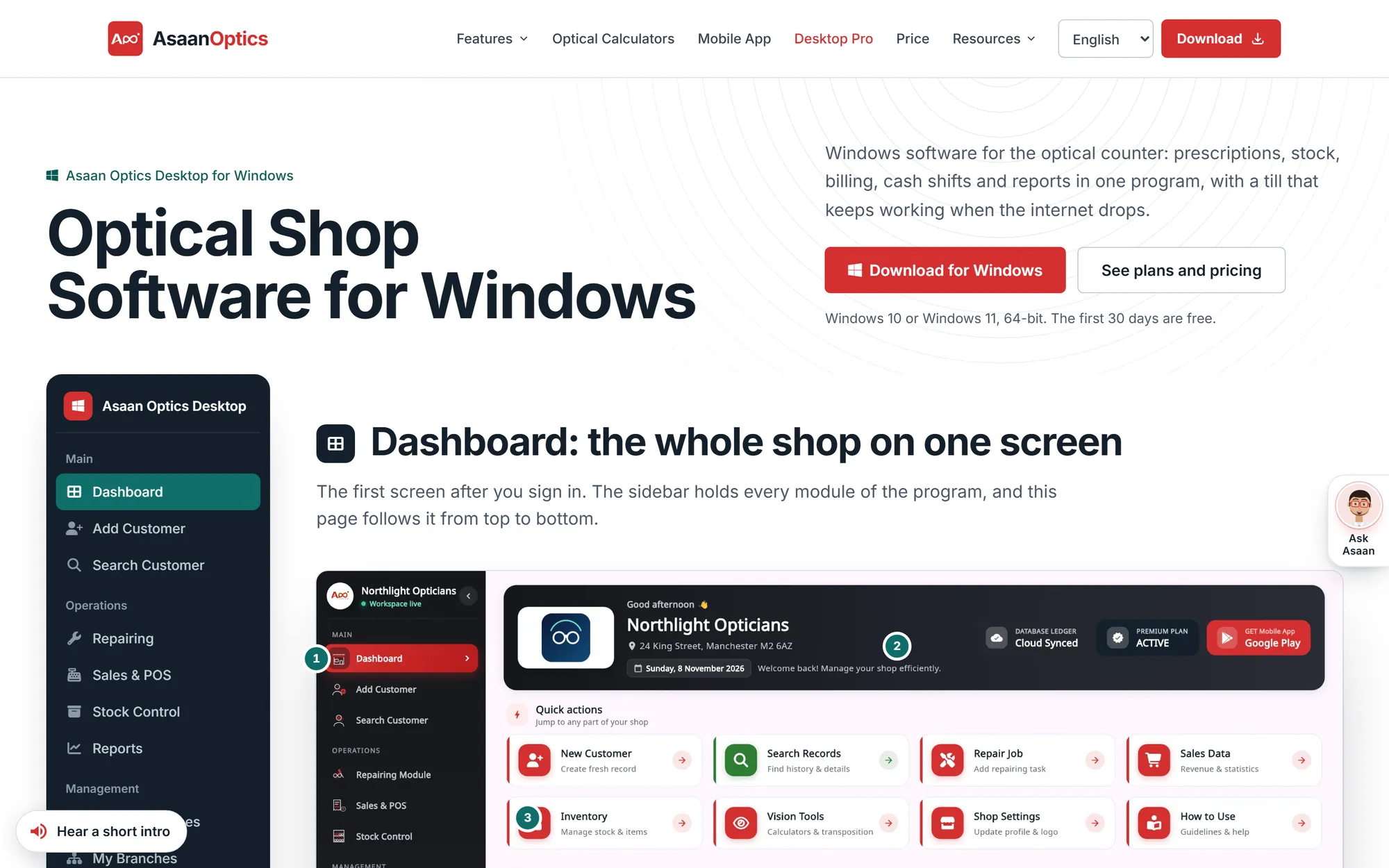
The desktop app at the counter: a new sale with a server-issued serial, and the Stock Control Center that shows what the stock is worth and what needs reordering.
Customers and prescriptions
Customer search on the PC with balances, order status and WhatsApp actions, and a prescription order on Android with the prescription scanner.
Optical calculators
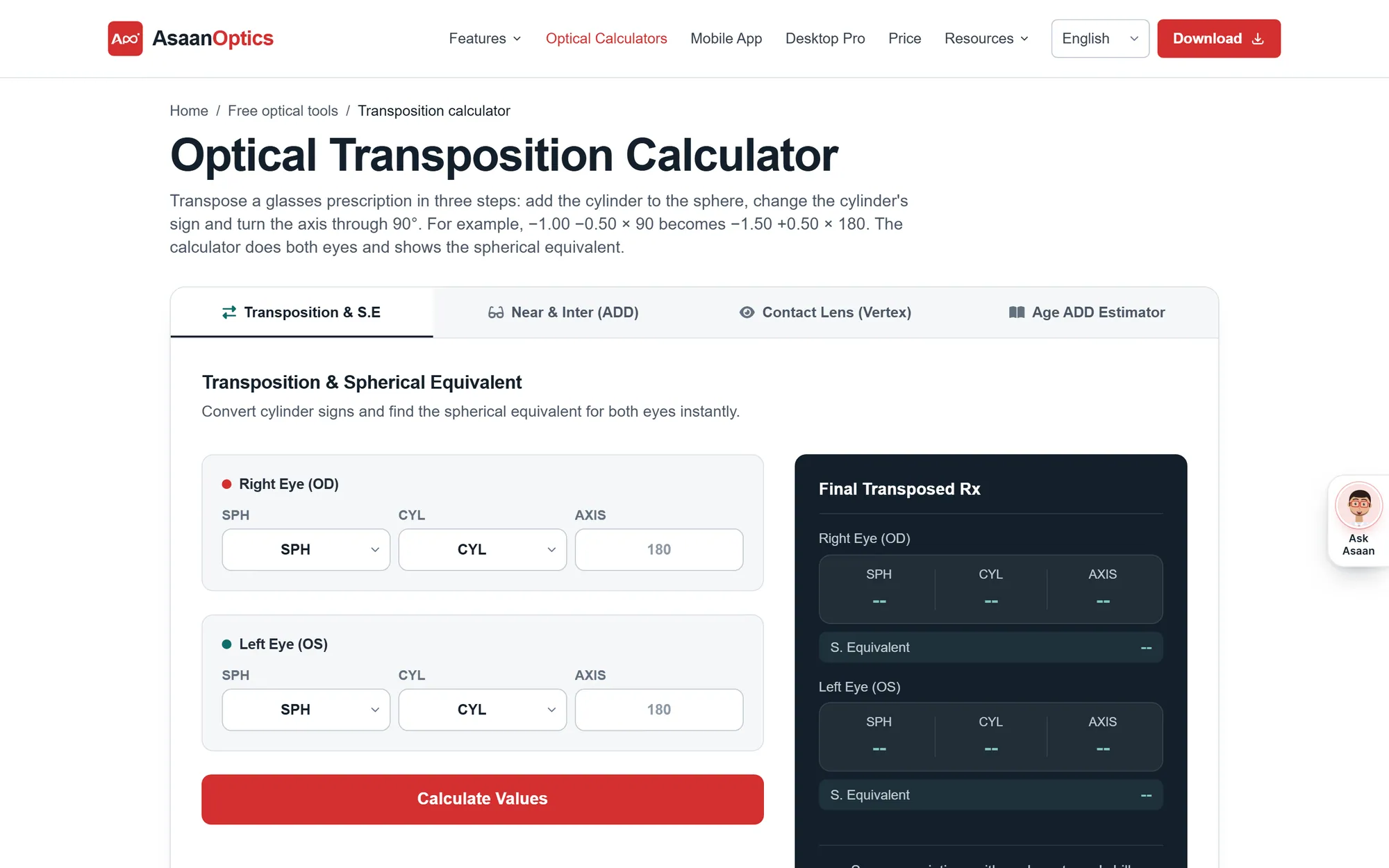
Nineteen calculators in five categories, from transposition and vertex distance to lens thickness and blank size, with results that update as you type.
The website and free tools
I built asaanoptics.com as well: product pages in six languages, downloads, pricing, tutorials and free optical calculators that bring in most of its search traffic.
Business impact
Asaan Optics grew through a useful product, search-friendly content, free optical calculators and a library of tutorial videos.
- Users
- 1,900+UsersOptical shop owners and staff using the apps
- Downloads
- 3,000+DownloadsAndroid and Windows apps combined
- Website visitors
- 145K+Website visitorsasaanoptics.com, within three months
3 months. No paid advertising.
Traffic came from search, free optical calculators and tutorial videos, not ads.
Figures reported by the product owner, November 2026.
- 4.8
- Google Play ratingFrom 116 reviews on the Pakistan storefront, November 2026
- 37
- Tutorial videosThe Asaan Optics Tutorials playlist on YouTube
Download the apps
- Get it on Google Play (opens in a new tab)
Android
Free to install, with paid plans through Google Play
- Download for Windows (opens in a new tab)
Windows
Windows 10/11, 64-bit, 30-day free trial
- Visit asaanoptics.com (opens in a new tab)
Website
Features, pricing, free optical calculators and video tutorials
The iPhone app is not publicly released yet.
See it working
Asaan Optics Tutorials: Complete Course: 37 short videos that walk through a working day in an optical shop, from the first customer to closing the cash drawer.
More from the playlist
- Optical Shop Software in 90 Seconds: What Is Asaan Optics? (opens YouTube in a new tab)
- Optical Store Software Demo: A Working Day, Open to Close (opens YouTube in a new tab)
- Optical Shop Management Software: A Full Tour in 3 Minutes (opens YouTube in a new tab)
- Optical Shop App: Phone or Computer, Which Do You Need? (opens YouTube in a new tab)
Related projects
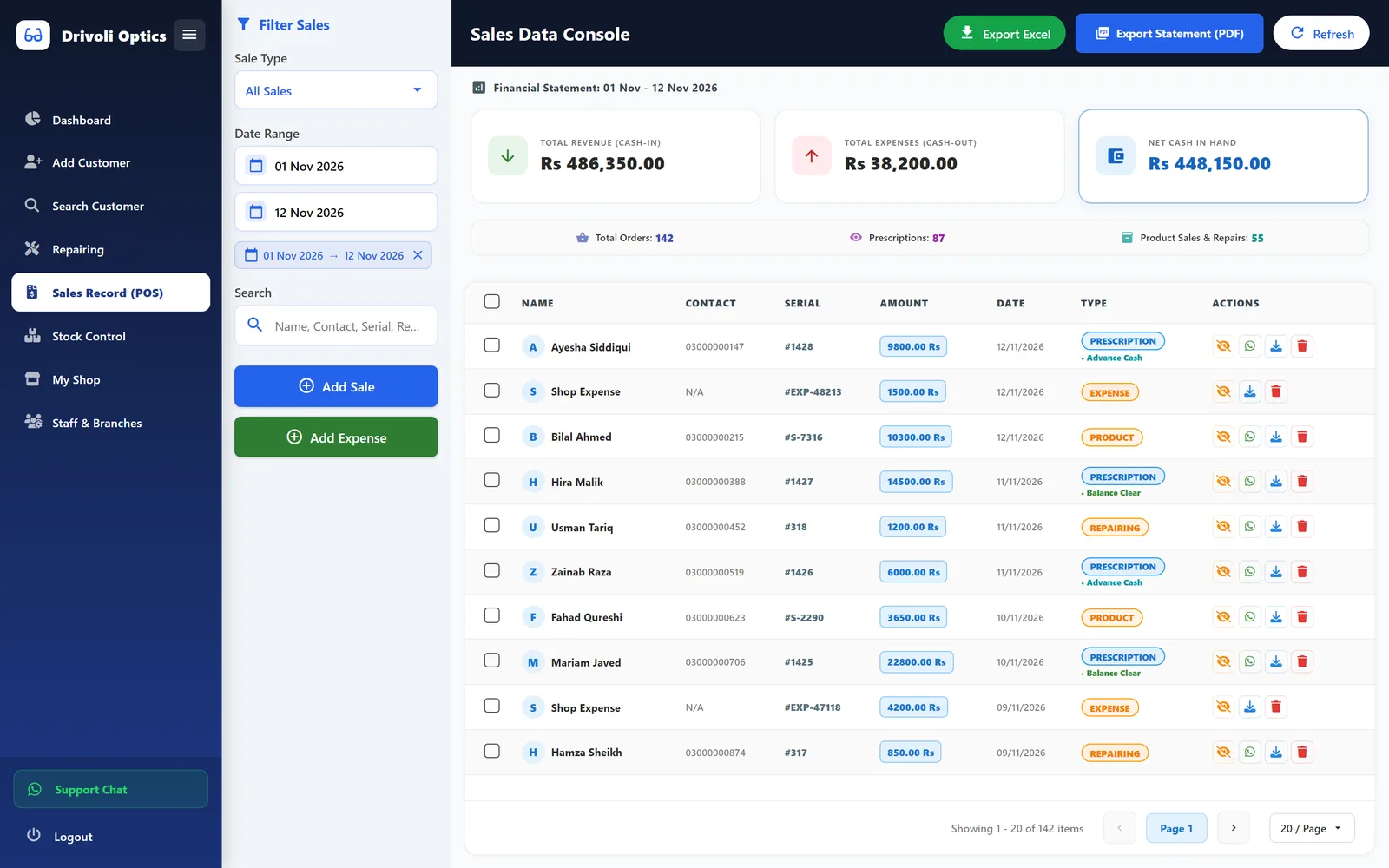
Optical retail POS and prescription system
Drivoli Optics Software
A multi-branch Windows desktop system for an optical retailer, covering prescriptions, stock, counter sales, repairs and supplier ledgers.
- Desktop app
- Business system
- SaaS product
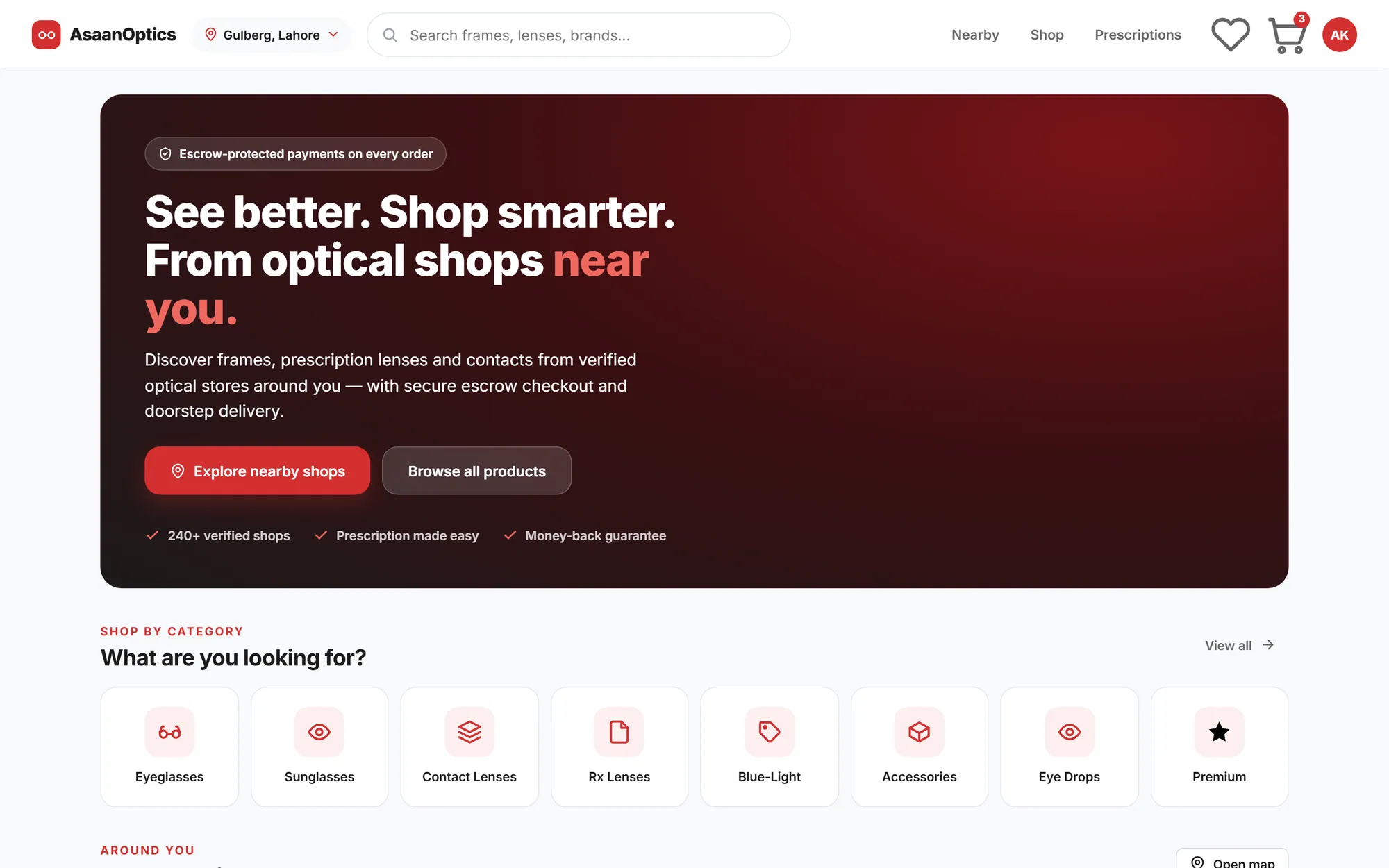
Multi-vendor optical marketplace
AsaanOptics Marketplace
A multi-vendor marketplace for optical shops in Pakistan, with prescription ordering, nearby search and escrow-style checkout, currently in development.
- Web application
- E-commerce
- SaaS product
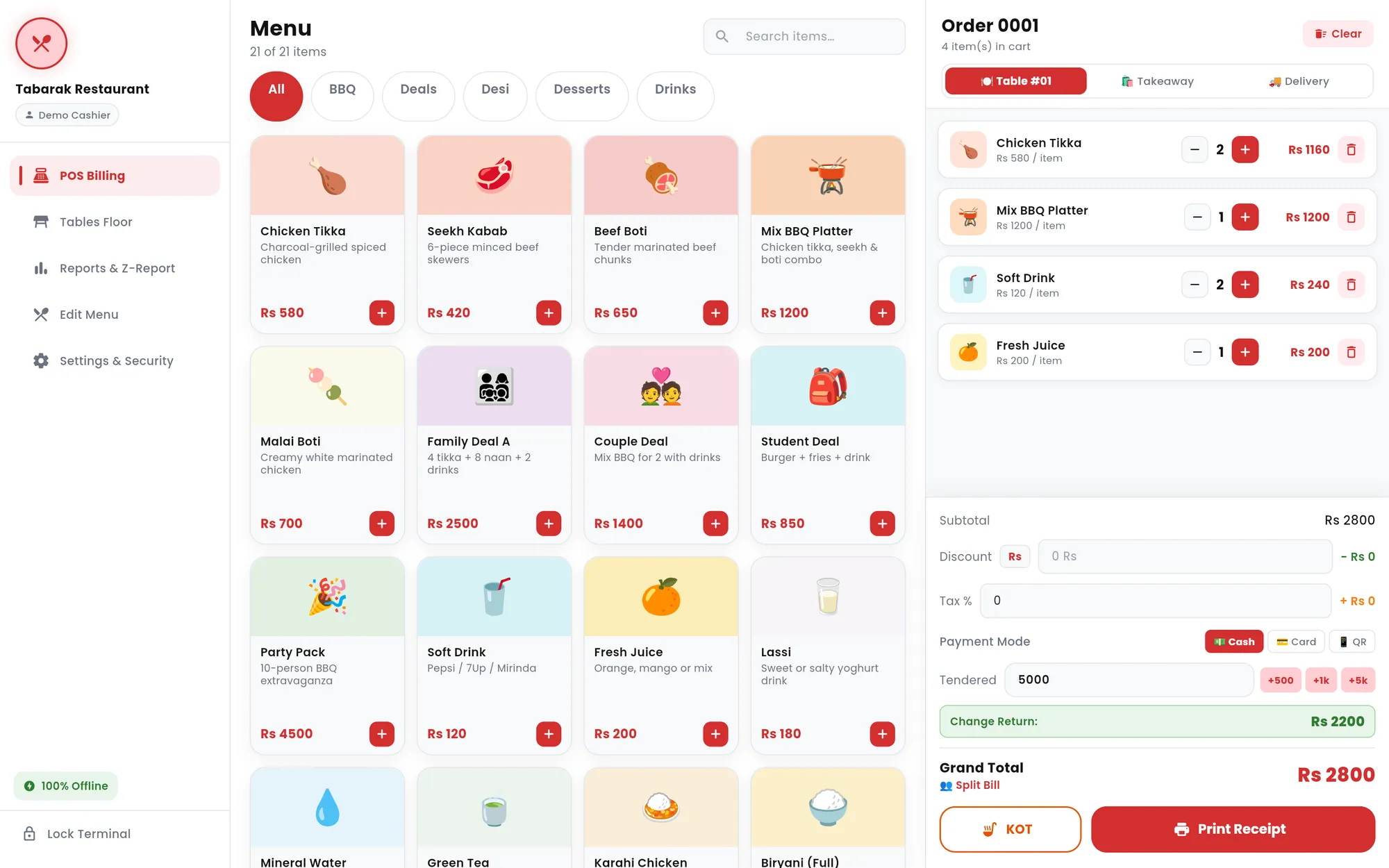
Offline restaurant POS
Tabarak POS
An offline-first restaurant point of sale for tablets and Windows PCs, with billing, kitchen tickets, tables, reports and thermal receipts.
- Desktop app
- Mobile app
- Business system
Need software built around how your shop actually works?
Asaan Optics started as a fix for real problems at optical counters. If your business runs on paper registers or spreadsheets, I can help you replace them with a system your team will use.